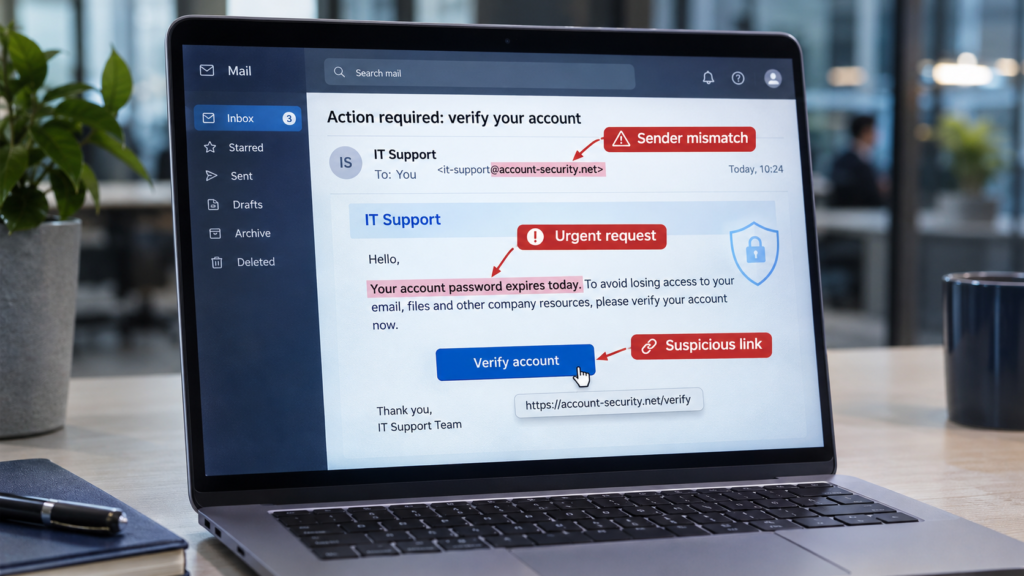
Phishing emails used to be easy to spot: clumsy spelling, strange formatting, an improbable prince. Today’s are often polished, well written and convincingly branded. Some are written specifically for your business, using names and details found online.
The good news is that even convincing phishing emails tend to give themselves away in the same few ways. Once your team knows what to look for — and what to do next — most attacks fall at the first hurdle.
Look past how the email looks. Focus on what it’s asking you to do.
A phishing email always wants something: you to click a link, open an attachment, enter a password, pay money or share information. The request is where the danger is — so that’s where to focus your attention.
The warning signs that still work
Pressure
Urgency, deadlines and threats: “your account will be closed today”, “payment overdue”, “I need this before my meeting”. Pressure is designed to stop you thinking.
A request that’s out of the ordinary
A supplier changing bank details by email. The boss asking for gift cards. A login prompt for a system you didn’t try to use.
Sender details that don’t add up
A display name that looks right with an address that doesn’t, a lookalike domain, or a reply that goes somewhere different from where it came from.
Other clues worth checking:
- Links that go somewhere unexpected. Hover over a link (or press and hold on a phone) to see the real address before clicking.
- Unexpected attachments, especially documents that ask you to “enable content” or log in to view them.
- A login page you reached from an email. If an email sends you to sign in, close it and go to the website or app directly instead.
- Something that just feels off — an unusual greeting, tone or time of day for that sender.
The most expensive kind: payment fraud
Some of the most costly attacks don’t contain a link at all. An attacker poses as a supplier, a customer or a director and asks for a payment — or for bank details to be changed for future invoices. Sometimes the email genuinely comes from a supplier’s compromised mailbox, which makes it very hard to spot.
The defence is a simple rule that everyone follows: any new or changed bank details are confirmed by phone, using a number you already have on file — never one from the email itself.
What to do if something looks suspicious
- Don’t click, reply or open attachments.
- Check through another channel. Call the person or company on a number you already know.
- Report it internally, so whoever looks after your IT can warn others and block it.
- Report it to the NCSC. In the UK, forward suspicious emails to report@phishing.gov.uk, and suspicious texts to 7726.
- Then delete it.
If someone has already clicked
Mistakes happen — and the faster they’re reported, the less damage they do. Make it clear that reporting a click is always the right thing to do and never gets anyone in trouble. Then change the affected password straight away, check that MFA is on, and let your IT support check the account and device.
The practical takeaway Focus on what an email is asking you to do, verify anything unusual through a different channel, confirm all bank-detail changes by phone, and make reporting quick, easy and blame-free.
Frequently asked questions
Won’t our spam filter catch these?
Filters catch a lot, but no filter catches everything — especially targeted emails sent from genuine but compromised accounts. Staff awareness is the last line of defence.
Does MFA help against phishing?
Yes. If someone does give away their password, MFA usually stops the attacker using it. Phishing-resistant methods such as passkeys and security keys are the strongest protection.
Is phishing training worth it?
Short, regular, practical sessions help far more than an annual lecture. The goal is a team that pauses and checks, and reports things quickly.
What if it’s a text message or a phone call?
The same rules apply. Be wary of urgency and unusual requests, and verify through a channel you already trust.
Where Cholcom fits
We help businesses reduce phishing risk with email filtering, MFA, sensible payment-verification processes and practical staff awareness — and we respond quickly when something gets through.
Want your team better prepared for the next phishing email? Get in touch and we’ll talk you through the options.